Value Suggest
The Value Suggest module adds an auto-complete feature to specific properties in a resource template, and draws on controlled vocabularies (see the end of this page for a complete list) to help users fill them out.
Value Suggest appears when a user is editing the metadata of a resource (an item, a piece of media, or an item set) that uses the enabled resource template. It functions as a data type, but works like a modification to a text field: a user can start typing and select a suggestion from the dropdown, or ignore the dropdown and enter in a textual entry manually.
This module also allows any field to be set to suggest values already stored in that property across the entire Omeka installation. These suggested values can be narrowed by only the same property on resources with the same class, or only the same property on resources using the same resource template, to limit the number of suggestions and make them more relevant.
This functionality helps those building an Omeka site encourage consistent metadata input and data compatibility with other databases of records. Note that Value Suggest offers, but cannot require, that users select values from the autosuggest feature. Users will always have the option of creating their own text value instead.
Value Suggest data types can be included in combination with other data types such as URIs in order to encourage interoperable metadata practices to outside databases such as Wikidata.
Add suggestions to a resource template
Value Suggest vocabularies are applied through resource templates. For additional information on resource templates, see the resource template documentation.
From the Resources templates page in the admin dashboard, either add a new template or edit an existing one.
Add the property to which you want to apply the Value Suggest.
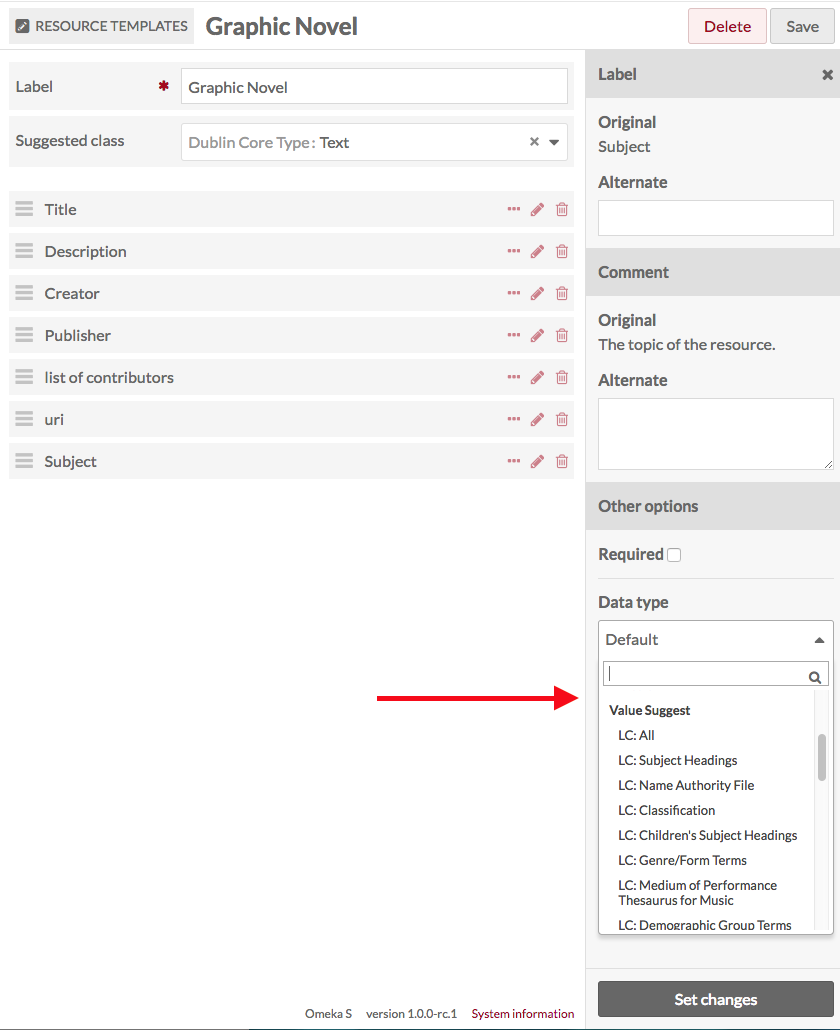
Once the property is added to the template, click the pencil/edit icon for that property.
At the bottom of the drawer which opens on the right, open the « Data type » dropdown. Below the standard options, you will see the Value Suggest options. Select the vocabulary you want to use from the dropdown. Note that you can add alternate labels and comments for the property in this drawer.
Click the « Set changes » button at the bottom of the drawer to assign the values to the property.
Save changes to the resource template.
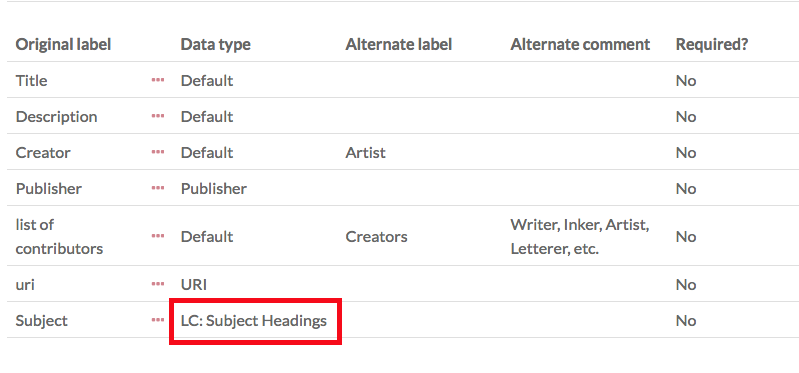
When you click the title of a resource template to see its details, the Value Suggest vocabulary will appear under the Data type table heading.
Adding Value Suggest to resources
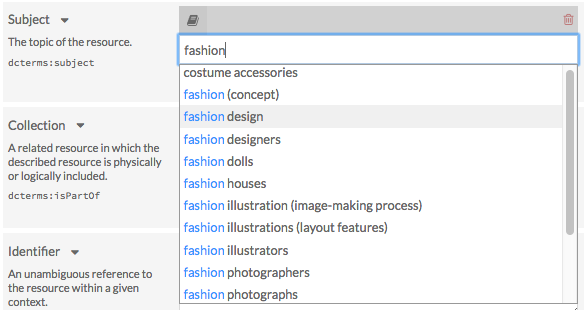
When a Value Suggest resource template is used for an item, media, or item set, the designated properties will auto-suggest values from the vocabulary specified in the template.
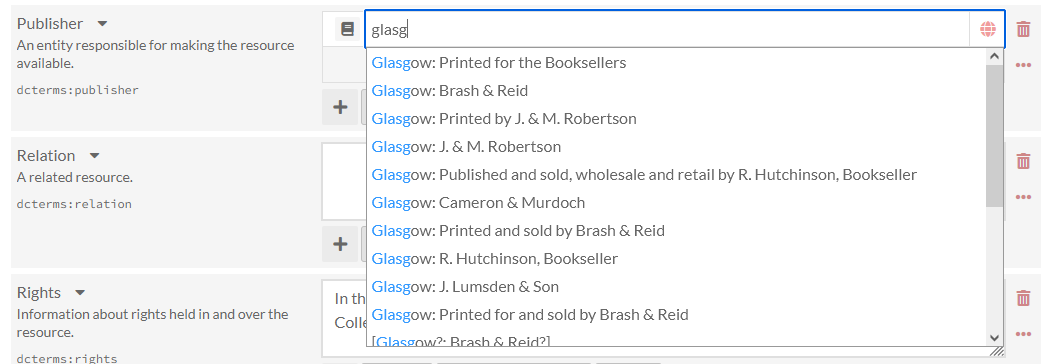
Users must start typing in the open text box of that specific property to prompt the auto-suggest feature. There may be a slight delay, but a drop-down menu will appear with choices drawn directly from the authority or vocabulary list you have associated with that property. In some cases, your text will search behind-the-scenes values: for example, ROR will display organization names with matching acronyms; ORCID will display researcher names that match an ORCID ID you have entered.
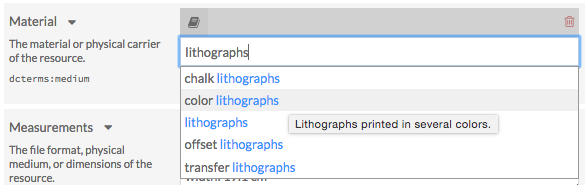
Hover over selections in the dropdown menu for a description of that vocabulary.
After selecting a value, a box containing a URL should appear under the value. This link will direct visitors to a webpage with additional information on the value selected. This box can be removed by clicking the « X ».

Internal suggestions
This module offers the ability to suggest values currently stored in your Omeka installation:
Omeka: Property (values of the same property, for example
dcterms:creator)Omeka: Property / Resource template (values of the same property that are being used by items that share the same resource template, for example « Base resource »)
Omeka: Property / Resource class (values of the same property that are being used by items that share the same class, for example
dctype:StillImage).
Available vocabularies
This module includes the following vocabularies:
Dublin Core
Gemeinsame Normdatie (GND)
GeoNames
The Getty Vocabularies
Homosaurus
IdRef
Library of Congress Linked Data Service
Nomenclature
Nuovo Soggettario
OCLC Metadata Services
ORCID (Open Researcher and Contributor ID)
PACTOLS of Frantiq
PeriodO
RDA Value Vocabularies
RightsStatements.org
Research Organization Registry (ROR)
Tesauros del patrimonio cultural de España
UNESCO
Les vocabulaires du Ministère de la Culture
Thesaurus de la Universitat de Barcelona (THUB).
Note that the NDE Termennetwerk vocabularies are now available as a separate module. That module requires Value Suggest to be installed and active.
!!! note Some vocabularies appear in multiple languages in the list below: for example, Homosaurus (in English) is listed separately from the Dutch translation of Homosaurus found in the NDE Termennetwerk module. Search the list and refer to the services to see which languages they support. We have indicated languages here for services that serve primarily one (non-English) language.
Dublin Core (DCMI Metadata Terms)
Classes
Elements
Terms
Types.
Gemeinsame Normdatei (GND) (de)
The GND contains standardized entries for persons, corporations, congresses, geographical areas, keywords and work titles.
GeoNames
The GeoNames geographical database
GeoNames features.
The Getty Vocabularies
The Art & Architecture Thesaurus (AAT)
The Getty Thesaurus of Geographic Names (TGN)
The Union List of Artist Names (ULAN)
Cultural Objects Name Authority (CONA)
Getty Iconography Authority (IA).
Homosaurus
Homosaurus.org linked data vocabulary.
IdRef (fr)
The French national database of identifiers for research (all repositories)
Person names
Collectivities (Corporations)
Conferences
Subject headings (all)
Subject headings RAMEAU (Répertoire d’autorité-matière encyclopédique et alphabétique unifié, or Unified encyclopaedic and alphabetical list of subject authorities)
Subject headings F-MeSH (French version of the medical subject headings)
Geographic names
Family names
Titles
Authors-Titles
Trademarks
PPN (unique identifier used for any item in all the database)
Libraries (RCR: Répertoire des centres de ressources).
Library of Congress Linked Data Service
All
Subject Headings
Name Authority File (LCNAF)
Classification
Children’s Subject Headings
Genre/Form Terms (LCGFT)
Medium of Performance Thesaurus for Music
Demographic Group Terms
Thesaurus for Graphic Materials
AFS Ethnographic Thesaurus
Cultural Heritage Organizations
ISO639-1 Languages
ISO639-2 Languages
ISO639-5 Languages
MARC Countries
MARC Geographic Areas
MARC Languages
MARC Relators
LC Rare Materials Cataloging.
Nomenclature for Museum Cataloging
All
Category 01: Built Environment Objects
Category 02: Furnishings
Category 03: Personal Objects
Category 04: Tools & Equipment for Materials
Category 05: Tools & Equipment for Science & Technology
Category 06: Tools & Equipment for Communication
Category 07: Distribution & Transportation Objects
Category 08: Communication Objects
Category 09: Recreational Objects
Category 10: Unclassifiable Objects.
Nuovo Soggettario (it)
Agenti: Organismi
Agenti: Organizzazioni
Agenti: Persone e gruppi
Azioni: Attività
Azioni: Discipline
Azioni: Processi
Cose: Forme
Cose: Materia
Cose: Oggetti
Cose: Spazio
Cose: Strumenti
Cose: Strutture
Tempo.
OCLC Metadata Services
The Virtual International Authority File (VIAF)
Faceted Application of Subject Terminologies (FAST).
ORCID (Open Researcher and Contributor ID)
ORCID. Search by name or by entering in an ORCID number and selecting the name from the dropdown.
PACTOLS of Frantiq (fr)
The entire PACTOLS thesaurus
The subject group only.
PeriodO
A gazetteer of period definitions for linking and visualizing data.
RDA Value Vocabularies
RDA Reference value vocabularies
Aspect Ratio Designation
Bibliographic Format
Broadcast Standard
Carrier Extent Unit
Carrier Type
Cartographic Data Type
Colour Content
Configuration of Playback Channels
Content Type
Conventional Collective Title
File Type
Font Size
Form of Musical Notation
Form of Notated Movement
Form of Tactile Notation
Format of Notated Music
Frequency
Generation
Groove Pitch of an Analog Cylinder
Groove Width of an Analog Disc
Illustrative Content
Layout
Material
Media Type
Mode of Issuance
Polarity
Presentation Format
Production Method
Recording Medium
Reduction Ratio Designation
Regional Encoding
Scale Designation
Sound Content
Special Playback Characteristics
Status of Identification
Terms
Track Configuration
Type of Recording
Video Format.
RDA Local value vocabularies
Gender.
RDA/ONIX Framework value vocabularies
Character
Extension Mode
Extension Requirement
Extension Termination
Housing Format
Image Dimensionality
Image Movement
Interaction
Intermediation Tool
Revision Mode
Revision Requirement
Revision Termination
Sensory Mode
Storage Medium Format.
RightsStatements.org
Standardized rights statements for cultural heritage institutions that can be used to communicate the copyright and re-use status of digital objects to the public.
Research Organization Registry (ROR)
The Research Organization Registry (ROR) is a global, community-led registry of open persistent identifiers for research organizations.
Tesauros del patrimonio cultural de España (es)
Diccionario de Bienes Culturales
Diccionario de Materias
Diccionario de Técnicas
Diccionario de Contextos Culturales
Diccionario Geográfico
Diccionario de Toponimia Histórica
Diccionario de Cerámica
Diccionario de Numismática
Diccionario de Mobiliario.
UNESCO (es)
Tesauro
Nomenclatura de Ciencia y Tecnología
Biblioteca Digital Floridablanca.
Les vocabulaires du Ministère de la Culture (fr)
Catégories techniques et domaines - Inventaire/MH
Domaines archivistiques pour l’indexation des circulaires
Etat de conservation du patrimoine mobilier - Inventaire/MH
Inscriptions, marques, emblématique et poinçons - Inventaire/MH
Liste d’autorité Actions pour l’indexation des archives locales
Liste d’autorité Contexte historique pour l’indexation des archives locales
Liste d’autorité Typologie documentaire pour l’indexation des archives locales
Liste d’autorités Auteurs - Joconde
Liste d’autorités Domaines - Joconde
Liste d’autorités Découverte - Joconde
Liste d’autorités Dénomination - Joconde
Liste d’autorités Genèse - Joconde
Liste d’autorités Inscriptions - Joconde
Liste d’autorités Lieux - Joconde
Liste d’autorités Localisation - Joconde
Liste d’autorités Périodes - Joconde
Liste d’autorités Représentation - Joconde
Liste d’autorités Sources de la représentation - Joconde
Liste d’autorités Techniques – Joconde
Liste d’autorités Utilisation - Joconde
Liste d’autorités Écoles - Joconde
Liste d’autorités Époques - Joconde
Matériau de la couverture - Inventaire/MH
Matériau du gros-oeuvre et mise en oeuvre - Inventaire/MH
Matériaux et techniques du patrimoine mobilier - Inventaire/MH
Nomenclatures HADOC
Référentiel de communicabilité des archives publiques
Stade de la création des objets mobiliers - Inventaire/MH
Statut de la propriété des Biens culturels - Inventaire/MH
Techniques photographiques
Thésaurus de la désignation des objets mobiliers
Thésaurus de la désignation des œuvres architecturales et des espaces aménagés
Thésaurus-matières pour l’indexation des archives locales
Type de la couverture - Inventaire/MH
Type de protection MH - Inventaire/MH
Vocabulaire des activités des entités productrices d’archives
Vocabulaire des altérations
Vocabulaire des domaines d’action ou objets des entités productrices d’archives
Vocabulaire pour les techniques photographiques.
Thesaurus de la Universitat de Barcelona (THUB) (es)
Thesaurus de la Universitat de Barcelona (THUB).